
How to draw a chemical structure from SMILES
Tutorial · macOS and Windows
SMILES strings are everywhere: in papers, supplier catalogues, PubChem and your colleagues' emails. ChemPencil turns a SMILES string into a clean, properly laid-out drawing in one step, including stereochemistry, and gives you canonical SMILES back from anything you draw.
Draw a structure from a SMILES string
- Copy the SMILES string, for example aspirin:
CC(=O)Oc1ccccc1C(=O)O. - In ChemPencil choose (⇧⌘M on Mac, Ctrl+Shift+M on Windows). The field is already filled in when the clipboard holds a SMILES string.
- Click OK. The structure is laid out with standard bond lengths and angles and placed in the middle of the visible canvas.
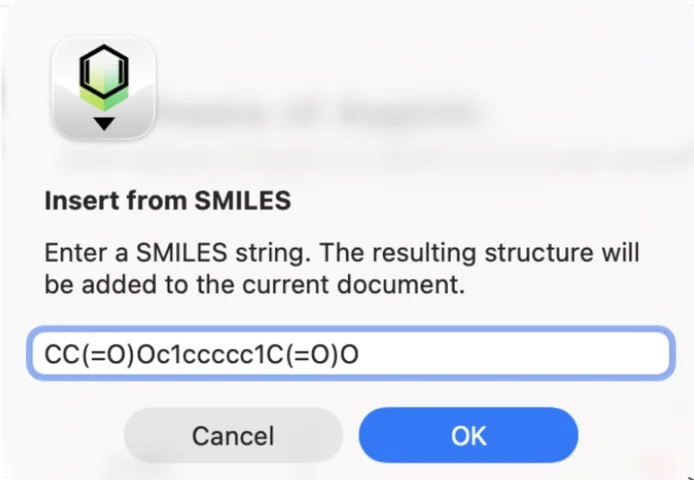
To start a fresh document instead, use . You can also simply paste: text containing SMILES (or a Molfile) pasted onto the canvas with ⌘V / Ctrl+V becomes a structure.
Stereochemistry is drawn for you
Stereo marks in the SMILES become real wedges and double-bond geometry.
N[C@@H](C)C(=O)O is drawn as L-alanine with a solid wedge to
the amine, and C/C=C/C as trans-but-2-ene. ChemPencil
reads the wedges back when it names the structure, so the (R)/(S) labels
always match the drawing. See
drawing wedge and hash bonds.
Copy SMILES from a drawing
- Draw or open the structure.
- On Mac choose ; on Windows choose (Ctrl+Shift+C).
- Paste the result wherever you need it.
The SMILES is canonical: the same structure always gives the same string, however you drew it, with stereochemistry included. For L-alanine you get:
When a document holds several molecules they are joined with a
.. To label a structure with its SMILES on the canvas, select
it, right-click it and choose Generate SMILES for Selection.
Try it yourself. ChemPencil runs on macOS 12 and later and on Windows 10 and 11.